COMPETITIVE INTELLIGENCE FOR REVENUE TEAMS

Stop building battlecards. Start building a competitive brain.

Your reps don't ignore battlecards because they don't care. They ignore them because searching through a Notion doc mid-call kills momentum. Fivep watches your competitors, captures field intel, and delivers human-approved answers directly in Slack. Before the call. Not after.

5-minute setup. Works where your team already works.

Field intel captured. No forms. Zero friction.

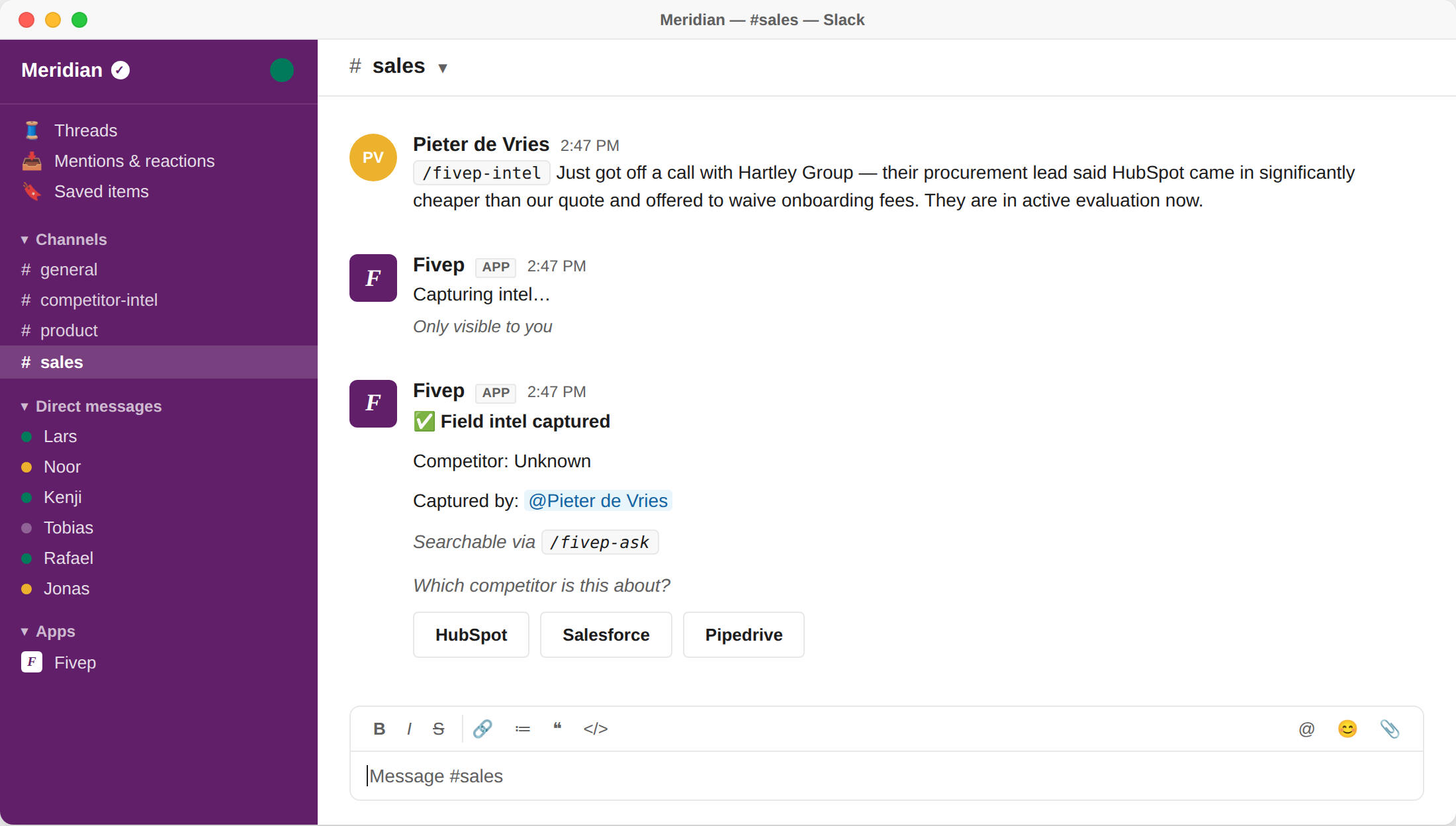
Reps hear competitor intelligence on every call. Most of it vanishes by 5 PM. With Fivep, they type /fivep-intel into Slack. Five seconds. Captured, timestamped, and saved before they close their laptop. The next rep who faces that competitor gets the exact playbook.
Ask. Get an answer. Win the call.

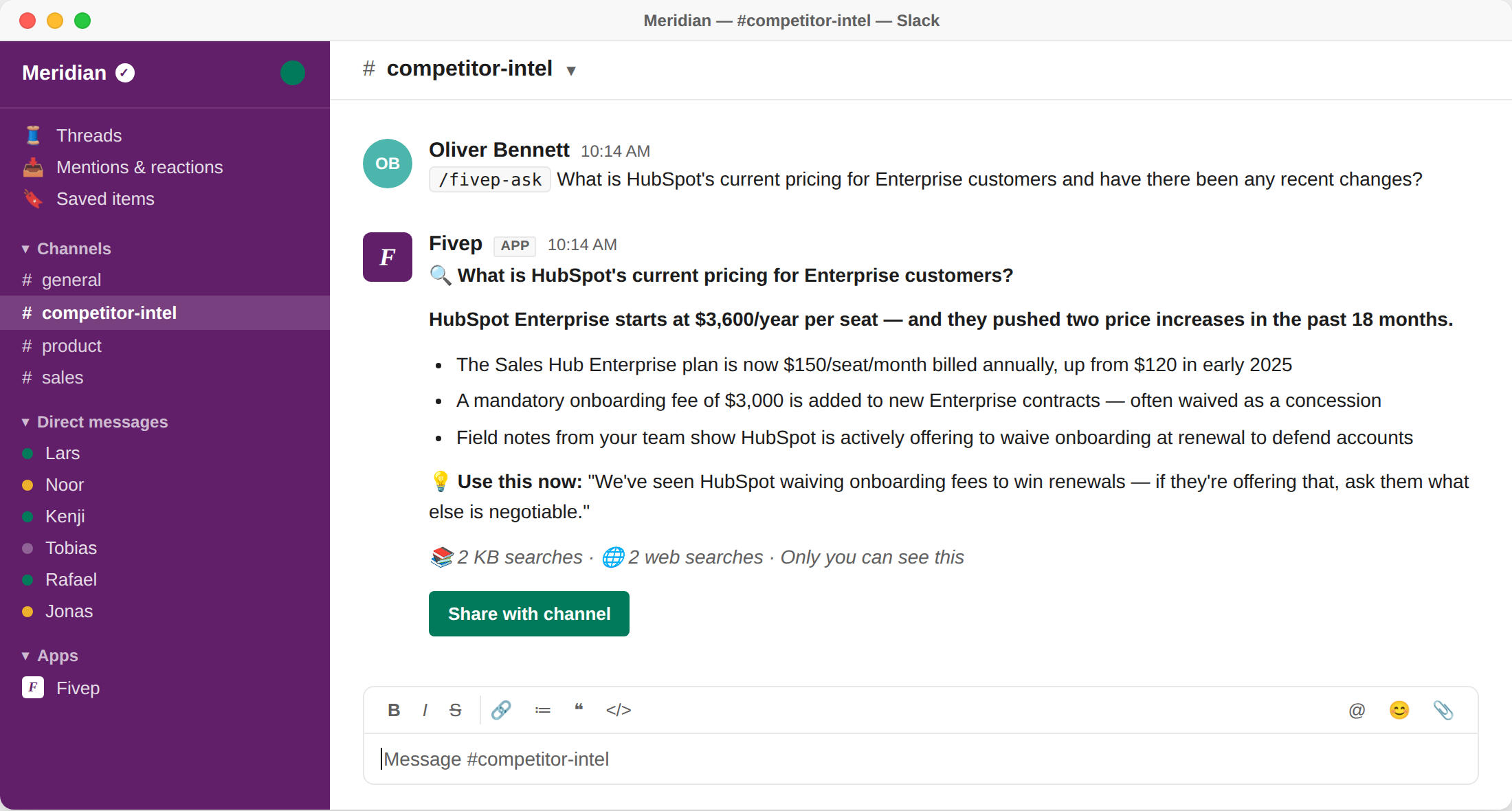
Four minutes before a demo, a rep types /fivep-ask into Slack. The answer comes back in seconds. Not a link to a dead document. Not a slide deck. An actual answer, built from approved competitor intel and your team's own field notes, right when they need it.

We do the lurking.

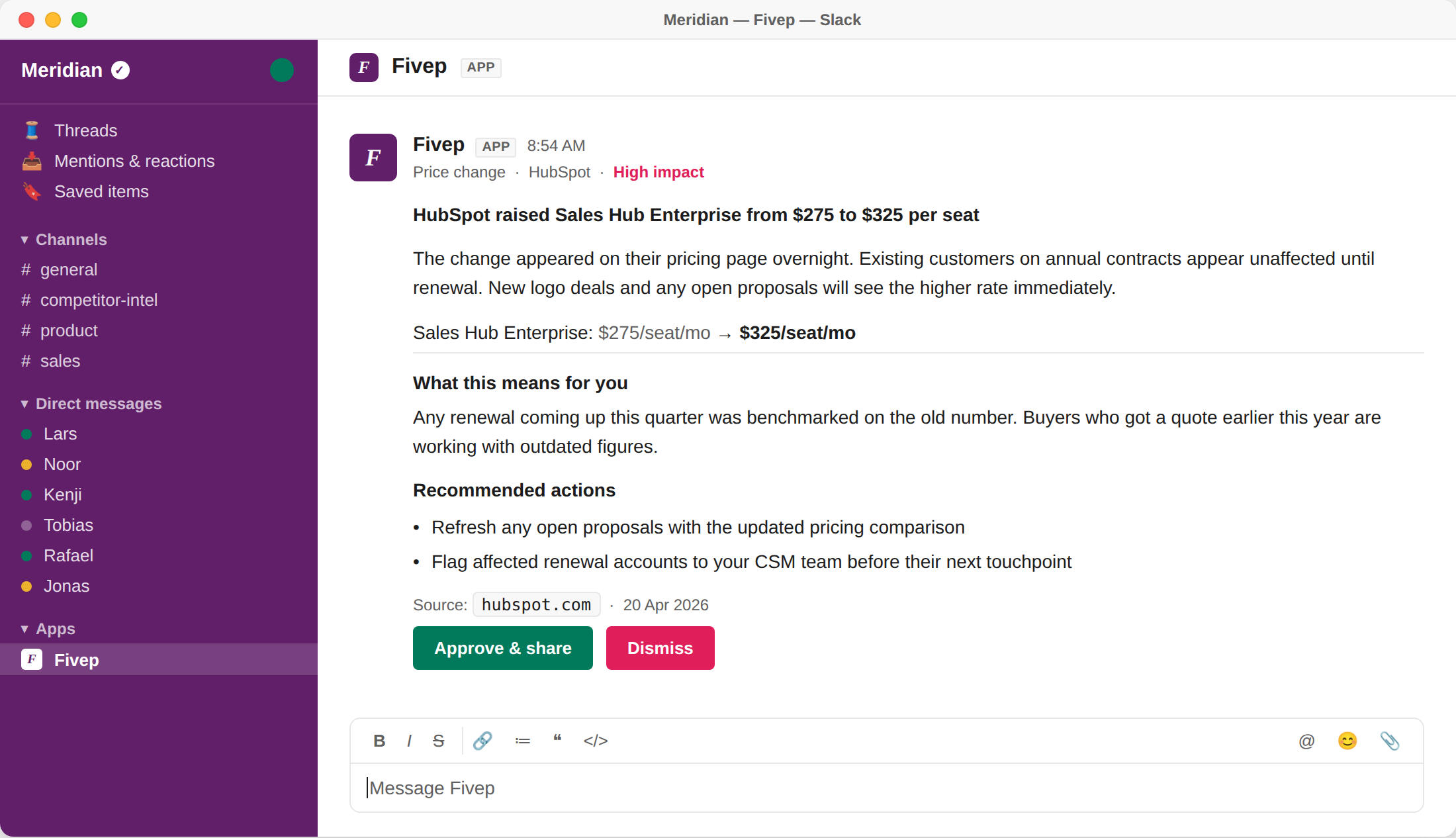
While you sleep, Compete watches the other guys. If a rival quietly changes pricing, rewrites their homepage, or starts hiring in your territory — you know by 9 AM. No noisy alerts. Just a human-approved summary pushed straight to your Slack channel, ready to act on.
One subscription. The whole GTM motion.

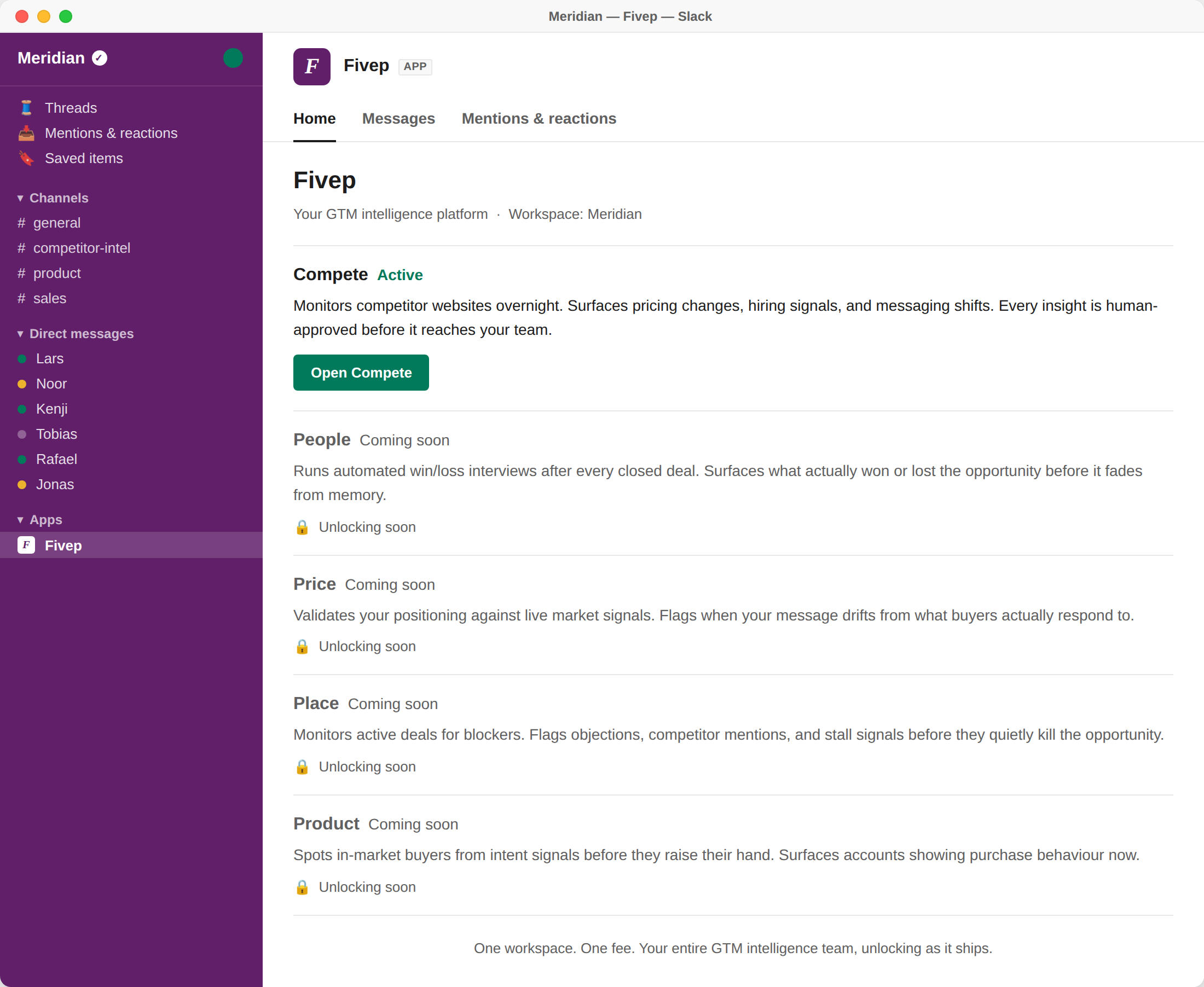
Fivep is an autonomous platform named after the 5 Ps of marketing. Today, the Compete agent fixes your battlecards. Soon, your workspace will quietly unlock new agents to run win/loss interviews (People), validate positioning (Price), flag deal blockers (Place), and spot in-market buyers (Product). One workspace. One fee. Your entire GTM intelligence team, unlocking as it ships.

see it yourself

Two minutes. No slides.

Watch a rep pull live competitive intel right before a demo. Real workspace. Real answers. No staged screenshots.

Every insight you see has been approved by a human before it reached the channel. No noise. No rogue information. That approval step is not a limitation — it's the point.

Workspace pricing

One price. Your whole team.

Most GTM tools charge per seat. The bill grows every time you hire. We think that's the wrong model. Add Fivep to your Slack workspace and every person in your revenue team gets access — from the first rep to the fiftieth.

  1. Unlimited team members: Your whole Slack workspace gets day-one access.

  2. No per-seat nonsense: Pay for the intel, not the headcount.

  3. All agents as they launch: Compete today. Every future GTM agent included.

Free plan

£0

Get started with our free plan.


What's included

  • 50 credits per month

  • Unlimited team members

  • No card required. Zero risk.

Need more credits? Upgrade in-app to pay-ss-you-go or a custom commitment plan. No calls required.

Your competitors aren't taking the week off.

Every week you wait, field intel vanishes, competitors make quiet moves, and reps walk into deals blind. Arm your team today.

5-minute setup. No card required. Your first insight tomorrow morning.

You're 60 seconds away.

Installing Fivep takes less time than updating a single battlecard. Enter your work email to claim your free workspace.

  1. Instant deployment. One install arms your entire Slack workspace immediately.

  2. Zero risk. Free up to 50 credits a month. No credit card required.

  3. No rogue AI. Everything is human-approved before it hits your sales channel.

You're on your way.

Slack is opening in a new tab. Authorise Fivep to drop straight into your pre-built workspace.

Need to finish later? Your install link is in your inbox, valid for 14 days.

Nothing opened? Use your install link →

What to do in Slack.

  1. Run /fivep-setup. Choose which Slack channel gets your daily intelligence. Takes 10 seconds.

  2. Add your first competitor. Type /fivep-monitor add and drop in their website URL. Fivep starts watching immediately.

  3. Your first intel lands tomorrow. Fivep scans their site and the broader web overnight and sends your first insight for review.

  4. Ask anything. Try /fivep-ask — it searches everything Fivep knows about your competitors and answers in plain English.

Error 404

Nothing here.

Like a static battlecard, this link is a dead end. You've clicked a broken URL or typed an address that doesn't exist.

The Fivep Operations Manual

Fivep watches your competitors, captures what your reps hear in the field, and drops human-approved intelligence straight into Slack. No portals. No new tabs.

This guide takes you from installation to your first approved insight. Setup takes exactly five minutes. Your first insight arrives tomorrow morning.


What's inside:


Part I: The Administrator Setup

(For Workspace Owners)

This section covers the engine room. You will authenticate the app, point it at your first competitor, and designate your intelligence gatekeepers.

Step 1: Connect your workspace

Click the Add to Slack button on fivep.ai. Review the standard permissions and click Allow.

Once redirected back to Slack, look for the welcome message.

Pro-Tip: Fivep lives under Apps in your Slack sidebar, not under Direct Messages. If you don't see it immediately, search "Fivep" in your Slack search bar to open the workspace.

Step 2: Route the intelligence

Pick the channel where approved insights will live. Choose a high-traffic channel your AEs, SDRs, and Product Marketers already watch.

Type this into Slack:

/fivep-setup channel #competitor-intel

Fivep will join the channel and confirm. Because nothing reaches this channel without your explicit approval, you never have to worry about managing noise.

Step 3: Point the agent

Tell Fivep exactly who to watch. You just need the bare domain and a clean label.

Type this:

/fivep-monitor add hubspot.com HubSpot

The agent confirms the monitor is active. The first sweep happens tonight.

Pro-Tip: Always use the bare domain. /fivep-monitor add hubspot.com HubSpot works perfectly. Adding https:// or www does not.

Step 4: Designate the gatekeepers

By default, the person who installed Fivep is the sole approver. Every overnight insight lands in your private DM first. You decide if the team sees it.

To share this responsibility (which you should, in case you are out of office):

/fivep-setup owner add @sarah

If an insight isn't approved, it never reaches the sales channel. It's a missed signal. Always have a backup approver.

Step 5: Check your engine

You can check your limits, plan tier, and active monitors at any time.

/fivep-account

Part II: Field Execution

(For the Entire Team)

Once setup is complete, Fivep belongs to your revenue team. Here are the four motions your reps will use every day.

1. The Overnight Approval Flow

While you sleep, Fivep scrapes the web. When it spots a significant competitor change, it writes a structured brief and sends it directly to your Approvers via DM.

You review the brief. If it's gold, click Approve & share. If it needs context, edit the headline right there in the modal. If it's irrelevant, click Dismiss.

2. Capture field intel instantly

When a rep hears a competitor mentioned on a call, they need to log it before the momentum dies. No forms. No CRM fields.

They just type:

/fivep-intel HubSpot came in 40% cheaper and offered to waive onboarding fees. Active evaluation.

Fivep automatically extracts the account, the competitor, and the pricing signal, dropping it straight into your compounding knowledge base.

3. Ask a question. Win the call.

Four minutes before a demo, a rep needs an answer. No searching through Notion.

They type:

/fivep-ask What is HubSpot's current Enterprise pricing?

Fivep reads your approved insights, your field notes, and the live web, delivering a private answer in seconds. If it's brilliant, the rep can click Share with channel to publish it for the team.

4. Browse the archives

Need to prep for a QBR? Pull the last ten approved insights for any rival.

/fivep-insights hubspot.com

The Command Cheat Sheet

CommandWhoAction
/fivep-monitorAnyoneView active monitors.
/fivep-monitor add <url> <label>OwnerPoint Fivep at a new competitor.
/fivep-monitor pause <url>OwnerTemporarily halt a monitor.
/fivep-monitor schedule <url>OwnerAdjust check frequency.
/fivep-ask <question>AnyoneInterrogate the knowledge base.
/fivep-intel <note>AnyoneCapture raw field intelligence.
/fivep-insights <url>AnyoneBrowse recent approved insights.
/fivep-setup channel #channelOwnerRoute where approved intel goes.
/fivep-accountOwnerCheck plan, limits, and billing.
/fivep-ops ticket <msg>AnyonePing Fivep support directly.
/fivep-helpAnyonePull this list in Slack.

What happens on Day One?

(Setting expectations for the first 24 hours)

Tonight: Fivep runs its first sweep. It crawls websites, pricing pages, hiring boards, and product feeds. It drafts briefs for anything that crosses the significance threshold.

Tomorrow Morning (9 AM): The briefs land in the Approver's DM. You review, approve, and the channel gets its first hit of real-time intelligence.

Important: If your DM is empty tomorrow morning, the tool isn't broken. It simply means your competitor didn't make a significant move overnight. High signal. Zero noise.

The Roll-out Announcement

Copy and paste this exact message into your #general channel to set the standard for your team. (Swap #your-channel with your actual insights channel).

Copy to clipboard

Fivep is now live.

We are now autonomously monitoring our key competitors. Approved intelligence will land in #your-channel each morning—pricing changes, product updates, and hiring signals. You will know exactly what the other guys are doing before it becomes common knowledge.

Three things you can do right now:

1. Log what you hear.
When a prospect mentions a competitor, capture it before the call ends. No formatting needed. Type: /fivep-intel <what you heard>

2. Get an instant answer.
Before a competitive demo, ask the agent. It searches our field notes and the live web. Type: /fivep-ask <your question>

3. Send feedback.
Found a bug or want a feature? Ping the developers directly. Type: /fivep-ops feedback <your message>

Our knowledge base compounds. Every field note you log today makes /fivep-ask a sharper weapon for the whole team tomorrow.

Need the full list? Type /fivep-help.